AI agent spend limits: which caps actually stop the meter
Every platform an agent runs on now ships a feature called a spend limit, and the phrase hides three different behaviours. Two of them fail your requests, one pauses the project, one only sends you an email, and the API platform most developers actually use has no per-user cap at all. We read all five sets of docs today. The short version: the switch you want exists, it's just rarely the default and sometimes not sold to you.
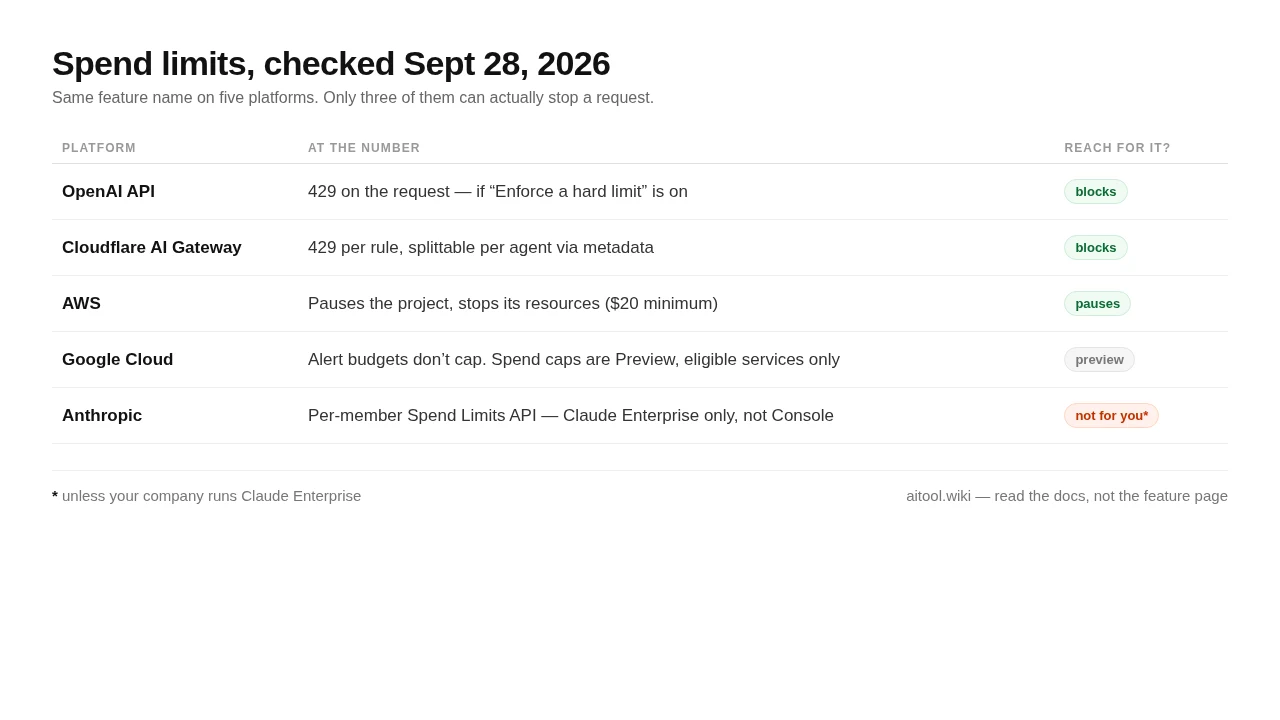
429 error" (developers.openai.com).The short version
- The word means three things. A notification (OpenAI spend alerts, Google Cloud alert budgets), a project kill switch (AWS spend limits, Google spend cap budgets in Preview), or a request-level block (OpenAI hard limits, Cloudflare AI Gateway spend limits). Only the last two stop money, and only the last one fails a request mid-flight.
- OpenAI's hard limit is off until you tick one box. Both the alert and the limit are configured on the same screen; the difference is "Enforce a hard limit". Miss it and you get an email about a bill you're still accruing.
- Anthropic's per-user limit is an Enterprise feature. The Spend Limits API is documented as available to Claude Enterprise organizations only, and explicitly not to Claude Platform (Claude Console) organizations — which is where API developers live.
- There is exactly one hard stop on a card: prepaid credits. No balance, no traffic. Everything else is a race between a counter and a request.
- For anyone running agents for a client: per-agent gateway rules, not a monthly cap, is the control that matches how the money actually leaves.
Same three words on five platforms
None of this is a scandal. It is a documentation problem with a money-shaped consequence: the feature is named the same everywhere, behaves differently everywhere, and the differences are only visible if you read past the feature page. Here is what each vendor's own docs say today.
| Platform | What it's called | What happens at the number | Who can use it |
|---|---|---|---|
| OpenAI API | Spend alert / hard spend limit, set per organization and per project | Alert: notification only, traffic continues. Hard limit: 429 with organization_spend_limit_exceeded or project_spend_limit_exceeded, and only if "Enforce a hard limit" is switched on |
Anyone with permission to manage org or project settings |
| Anthropic | Spend Limits API, per Claude Enterprise member | Blocks a member's spend once the effective limit for that member is reached; admins approve or deny increase requests | Claude Enterprise organizations only — not Claude Console (Claude Platform) organizations; usage credits must be turned on |
| Cursor | Set User Spend Limit, in the Teams Admin API | Per-member dollar cap on AI usage inside the team; integer dollars, null removes the cap |
Team admins; bulk route updates up to 100 members per request (Preview) |
| AWS | Spend limit, per project | Pauses the project, which stops its resources; notifications at 50%, 75% and 90%. Minimum limit is the greater of $20 or a conservative estimate of likely spend | Paid-plan accounts, project owners; the docs say the new experience is being released "to a limited number of customers" |
| Google Cloud | Budget alerts, or spend cap budget (Preview) | Alert budget: does not cap spending. Spend cap budget: blocks new usage for the specified service in that project at 100%; in-flight requests finish, persistent resources keep billing, a human lifts the cap | Project-level; spend caps are a Preview feature and apply to eligible services only |
| Cloudflare AI Gateway | Spend limits (Beta), per gateway | 429 blocks the request when cumulative spend in the window hits the limit. Scoped by provider, model or custom metadata — split by agent_id and each agent gets its own budget bucket |
Up to 20 rules per gateway; applies to BYOK and Unified Billing traffic alike |
Two rows in that table are worth pausing on. Google's documentation says out loud what most vendors only imply: "Setting an alerts-only budget doesn't automatically cap Google Cloud or Google Maps Platform usage or spending." That is one sentence, and it is the difference between a budget and a limit. And Cloudflare's is the only one designed for the way agents actually spend — per agent, per team, per environment, rather than one number for the whole company.
OpenAI: the switch exists, most people never flip it
The OpenAI docs are unusually plain about the gap. A spend alert "sends a notification; API traffic continues". A hard spend limit makes "affected API requests return a 429 error". They are separate controls on the same page, and the hard limit needs the Enforce a hard limit step when you save. If you ever set a limit and then watched a larger invoice arrive, that checkbox is the likely explanation, and it matches the complaint that showed up on Hacker News this week under the title "FYI: OpenAI 'spend limits' aren't always limits". It was a two-point post, so it never got an audience, but one commenter confirmed the pattern from the same week: "Had the same thing happen yesterday. I wonder how many more!" (LeoJB, HN).
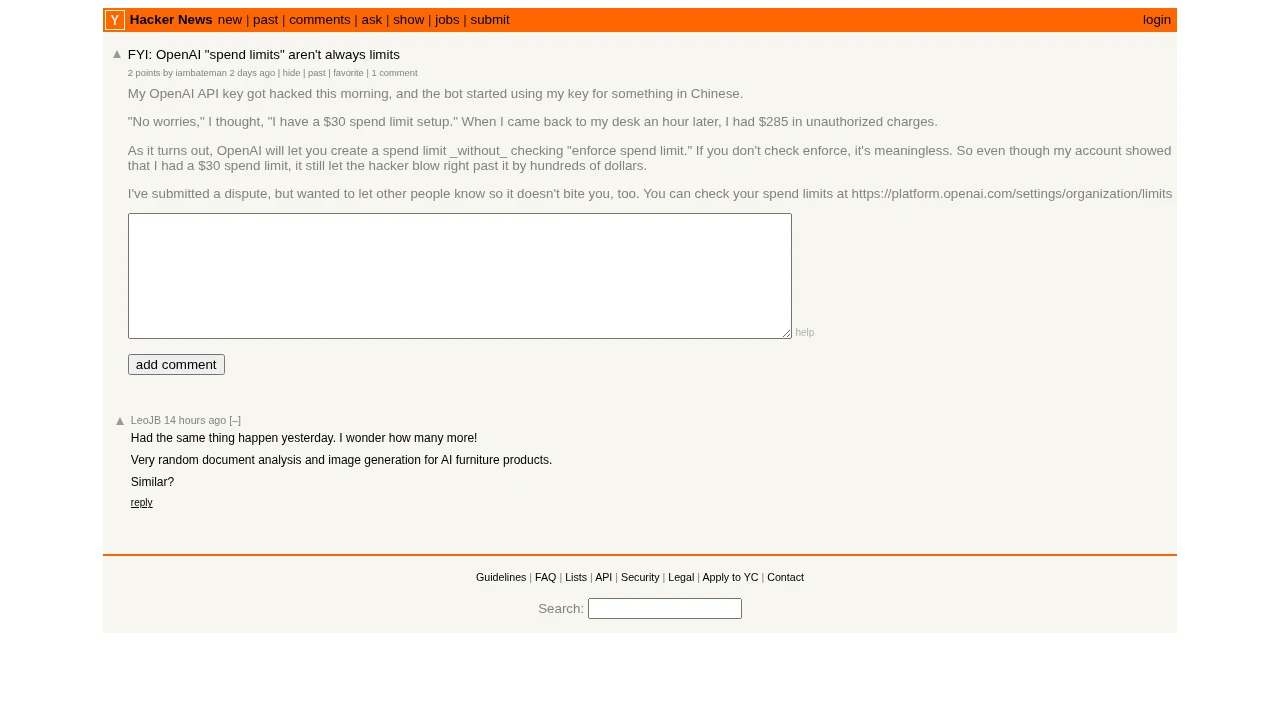
Three details from the same page matter more than the toggle.
- Organization and project limits are separate, and both can apply. A project limit governs traffic billed to that project; an organization limit governs everything. If you hand an agent its own project key and cap the project, that is the tightest control OpenAI currently sells you.
- Enforcement is not instantaneous. The docs put it as: "the API Platform can process a small amount of extra usage while the limit state propagates, so recorded spend can slightly exceed the configured amount." A hard limit is a hard stop with a soft edge.
- Your prepaid balance is a different error code.
credit_balance_exhaustedsits in the same troubleshooting list as the two spend-limit codes, which tells you the honest thing about cards and caps: the balance is what actually runs out.
Anthropic: the per-seat cap is sold to Enterprise
Anthropic's Spend Limits API is the most complete version of the idea on this list — and the most restricted. It resolves an effective spend limit for every member from a hierarchy: a per-user override if one exists, otherwise the group limit, otherwise the seat tier, otherwise the organization default. It exposes period-to-date spend per member, and it ships a queue of increase requests that an admin can approve or deny. That last part is the tell that this was built for procurement, not for a developer with a card.
"The Spend Limits API is available to Claude Enterprise organizations only. It is not available to Claude Platform (Claude Console) organizations."
Anthropic, Spend Limits API, read Sept 28, 2026
So if you pay Anthropic directly and use the Console, the control you get is a credit balance and the usage dashboards, not a per-seat cap. Two practical consequences: a team lead on the API plan cannot cap a reckless teammate at the vendor level, and any story about "we just set a spend limit in Claude" is about a Claude Enterprise contract rather than a developer account.
AWS and Google: the cap is the project, not the request
Both cloud platforms shipped the same shape of control this year, and both made the same design decision: when the meter runs, they stop the workload rather than filter the request. AWS's spend limits pause a project and stop its resources, with early warnings at 50%, 75% and 90%, and a floor on how low the limit can be set — "the greater of $20 or a conservative estimate of your likely spend", because hitting the limit is meant to be a surprise you nearly avoided. Google's spend cap budgets block new usage for a named service in a project, let in-flight requests finish, keep charging for persistent resources such as compute and storage, and require a human to lift the cap.
The Hacker News thread on the AWS launch (22 points) contained the question this whole category turns on. orf asked what happens when you set $20 and then immediately fire $40 of requests: "will 50% of those requests be blocked or will I be charged $40? I doubt they've added a globally consistent billing/charge counter to the S3 read path, so either I get charged $40 or AWS eats the additional $20." The answer, from someone who read the page, was that it is "a hard stop at the project level, with optional gradual controls in front of it. Nothing per-request" (thasli-p). An AWS engineer replied in the same thread (BeepBoop-Fab) that it had been a long time coming. Nobody in the thread disputed the shape of it: at this scale, billing state is eventually consistent, so the cap protects the project, not the request.
That is the right trade for a sandbox and the wrong one for production. Pausing a project at 3am because an experiment hit its ceiling is a feature if the project was an experiment.
The one pattern built for agents
The gateway approach inverts the vendor caps: instead of one number per company, it gives you a rule per dimension and blocks the request. Cloudflare's AI Gateway docs describe spend limit rules scoped by provider, model, or custom metadata, in two modes — split by value (each distinct value gets its own budget bucket) or filter by value (the rule applies only to one value). Attach an agent_id to every request and split by it, and a runaway agent burns its own bucket instead of the shared one. Up to 20 rules per gateway, and the docs are honest about the same caveat as OpenAI: "Spend limits are eventually consistent. The current request's cost is recorded after completion, so a burst of concurrent requests can briefly exceed the limit before enforcement catches up."
This is not a Cloudflare advertisement. The point is architectural: the vendor cap protects the account, the gateway rule protects the process, and only the second one is granular enough to survive an agent that retries.
What to do this week, in order
- Give every agent its own key and project. Organization-level limits are the last line, not the first. A per-project cap is what makes one agent's bad night survivable.
- Open the limits screen and check for the enforce box. On OpenAI that means Edit spend limit → Enforce a hard limit. If the only thing configured is an alert, you have a notification, not a limit.
- Move agent traffic to prepaid credits. The balance is the only cap that cannot lose a race with a request.
- If you run agents across more than one provider, put a gateway in front and write one rule per agent. Spend by agent, not by month, is the number you can actually debug.
- Assume clients and finance will ask for a hard number. Tell them which of the three meanings you implemented, and where that vendor's "eventually consistent" sentence lives. Being the person who read the docs is the whole job.
Who should care, and who can skip it
The judgement call
- Care, urgently, if an autonomous agent holds a live API key on a card. Turn the enforce box on today and put the agent on prepaid credits this week. This is the cheapest insurance in the whole AI stack.
- Care, mildly, if you're on Claude Enterprise. You already have the best per-member controls on this list; the useful part is the increase-request queue, which turns "can I have more budget" into an audited decision instead of a Slack message.
- Skip it if you're a solo developer on a subscription plan. Seat-based coding tools don't meter per request, so a "spend limit" there is a dashboard number rather than a control.
- Don't trust the word. If a vendor markets "budgets", read one line of their docs to find whether it says "cap" or "notify". Google says it in a sentence, which is more than most.
- Don't build on Preview features. Google's spend caps and AWS's project limits are both rolling out; neither is a thing to promise a client about production yet.
Sources
- OpenAI — Spend limits (read Sept 28, 2026)
- Anthropic — Spend Limits API (Claude Enterprise only)
- Cursor — Teams Admin API, Set User Spend Limit
- AWS — Create a spend limit in AWS Settings
- Google Cloud — Create budgets and set up spending alerts
- Google Cloud — Manage spend cap budgets (Preview)
- Cloudflare — AI Gateway spend limits
- Hacker News — FYI: OpenAI "spend limits" aren't always limits (Sept 25, 2026)
- Hacker News — AWS now supports spend limits (22 points, Sept 18, 2026)