Grammarly Alternatives (2026): Five Replacements, With Prices Checked Today
The short version: the September 23 backlash over Grammarly’s cancellation flow is the loudest thing to happen to the company since it renamed itself Superhuman — and almost every “alternatives” page ranking for this search is an affiliate list. After reading the 355-point thread and checking five pricing pages ourselves: Harper if you want free and open source, LanguageTool if you want a grammar checker with a US$5.83/month floor, ProWritingAid if you write long-form, Refine if you are on a Mac and want zero network calls, Vale if you live in a terminal — and none of them if what you actually wanted was a writing assistant.
What set this off
The thread title is blunt — “Grammarly will send unhinged messages to all your users if you try to cancel” — and it is a PSA from r/sysadmin, where the people who actually administer these seats live. The claim, from an admin who did not renew: canned emails and in-app pop-ups went out to every licensed user, telling them their access was ending and who at their company to contact about it (rawling, HN).
Read the thread properly and the picture is more interesting than one company being villainous. Two of the top comments push back on the wording:
“Doesn’t look that unhinged to me. An in-app notification saying ‘your access ends on X date and here is who you should contact if that isn’t what you want’ is exactly what I’d expect.”
“I think ‘unhinged’ is a ridiculous word for it. They aren’t crazy. ‘Outrageous’ is better. This will work on a lot of people, and they really will email their managers.”
What nobody in the thread disputes is why the cancellation is happening. As one sysadmin put it, IT teams “are routinely the people told to buy and manage Grammarly deployments, and we’re the people generally cancelling those services now given everyone is being pushed to use their flavor of AI instead” (technion, HN). The product did not lose an argument with its users. It got absorbed into a bigger budget line — which is also why the alternatives below split so cleanly into “cheap grammar checker” and “you already pay for an LLM.”
The five replacements, with today’s prices
| Tool | What it actually is | Price (checked 2026-09-24) |
|---|---|---|
| Harper | Open-source, rule-based linter. No LLM. Apache-2.0, 15,877 GitHub stars, maintained by Automattic. Extensions for Chrome, Edge, Firefox, VS Code, Obsidian, Neovim, Zed, WordPress. | Free |
| LanguageTool | Grammar and style checker, LGPL-2.1 core (15,077 stars). The paid tiers add enhanced grammar, punctuation and style checking. | Premium $5.83/mo billed annually ($69.90/yr) |
| ProWritingAid | Report-style analysis built for long documents: 25+ writing analysis reports, structure and pacing feedback, and separate manuscript tooling on top. | Premium $10/mo billed yearly ($120) · Premium Pro $12/mo ($144) |
| Refine | Local grammar checker for macOS 14+, v1.39, powered by Gemma 4 running on your machine. No account, works offline. | Free |
| Vale | Command-line prose linter for markdown and docs. MIT, 6,152 stars. Configurable style rules — the tool technical writers actually want. | Free |
Harper — the one the thread keeps circling back to
Harper’s selling point is that it deliberately does not use a language model. It runs a fixed rule set, which makes it fast and predictable — and, per one commenter who looked at the engine, it checks text in under 10ms, which is why it can be embedded in editors and run on every keystroke (a2128, HN). The consistency argument is the one that lands hardest against Grammarly: “Grammarly has been going downhill since they’ve been larding it with ‘AI features,’ it has become remarkably inconsistent. It will tell me to remove a comma one hour, and then tell me to add it back the next” (pram, HN). There is also an LSP server, so it lints grammar in your code comments (VTimofeenko, HN).
Where it loses: it will not rewrite a paragraph, change your tone, or make you sound more confident. If your job is writing, that is the feature you were paying Grammarly for.
LanguageTool — cheapest paid tier, and the origin story is awkward for Grammarly
The sharpest line about LanguageTool in the thread: Grammarly is “basically a closed-source version of LanguageTool” (bpiche, HN) — true in the sense that the open-source project has been doing rule-based checking since before the category had a category. What sold one commenter was restraint: after switching they wrote that it “isn’t as aggressive as Grammarly” and that they expected to drop their Grammarly subscription if it kept working (rickydroll, HN). At $5.83/month on annual billing it is also the cheapest paid option here that covers non-English writing properly — which matters, because most of the free tools on this page are English-first.
ProWritingAid — the long-form alternative nobody in the thread recommended
Being honest: we did not find a substantive Hacker News thread on ProWritingAid, and that is itself information — it is not a developer-loved tool. What it does have is the one thing Harper and LanguageTool do not: manuscript-level analysis, a free tier capped at 500 words at a time, and two paid tiers at $10 and $12 per month on yearly billing. If you write books or 5,000-word reports, the report format earns its place. If you write emails, it is expensive overkill.
Refine — free, local, and Mac-only
Refine runs a Gemma 4 model on your own machine, needs no account, and works offline. The catch is exactly what the launch thread flagged: a local model with a “fluency” feature that rewrites when you did not ask it to (it ships off by default, and users still reported it “constantly rewords things, adds random quotations, or does something pretty silly” — Nicell, HN). The privacy question is real in both directions: it is not open source, so “it runs locally” is a promise you are taking on trust, which one commenter put plainly — how do you ensure a future update does not start uploading? (mirrormaster, HN).
Vale — for the people who asked for a CLI
This one is in the article because it exists in the thread as a direct answer to a direct request: someone wanting “an old school grammar checker that works on the command line with markdown” (beej71, HN), answered with Vale (stuxnet79, HN). MIT licensed, 6,152 stars, style rules you write yourself. It is not a Grammarly replacement — it is what a documentation team replaces Grammarly with.
One price we could not verify. QuillBot came up in the thread as a switcher’s choice — “Grammarly would always mess up the formatting in my emails” (AbstractH24, HN) — but their pricing page serves a bot-protection challenge to us. We would rather print nothing than print a number we did not read ourselves.
And the claim you should not take at face value: “it’s a keylogger” (Walf, HN) is the kind of hyperbole that gets repeated, but the reply is fair: if you only use it in a web interface or via API, “it’s a keylogger in the same way Vim is a keylogger” (JohnKemeny, HN). The extension does read what you type in the browser. That is the actual trade, stated without the drama.
The real question: do you want a checker or a writer?
Four of the five tools above do not generate text. They find mistakes. That is a deliberate split, because the complaints in the thread are not about grammar quality — they are about what Grammarly became. “They are losing because they embraced AI at the detriment of what they were doing well. It was a good tool, that worked... then they decided to go with AI and using my writing for training” (mhitza, HN). “Grammarly was a great idea in the pre-AI era... I think this product and its revenue model will become obsolete pretty soon” (meerita, HN).
There is a version of this where the writing assistant you already pay for — Claude, ChatGPT, whatever your team standardised on — replaces the rewriting half of Grammarly for free, and a $0 linter replaces the checking half. If that is your situation, Harper alone is the whole answer. Our local model vs API breakdown covers the cost side if you would rather the rewriting never left your machine, and the note-taking privacy piece is the same argument applied to a different tool category.
The one thing worth watching: Grammarly’s university business. One commenter claims they were “losing a lot of university subscriptions after they started advertising how they offer a service to make LLM-written text look human-written” (LiamPowell, HN). We could not verify that from the outside, but it is consistent with a product that spent the last three years deciding which side of the AI-writing debate it was on — and still has not said.
Who should switch, and who should not
Switch if:
You are paying per seat for grammar checking and nothing else. You write mostly in a browser and care about where your keystrokes go. You are a team lead who got the “your access ends” email and realised nobody had used the tool since March.
Do not switch if:
You use the generative features on purpose — prompts, tone rewrites, the plagiarism and AI-detection checks. None of the five tools above will do that, and going from Grammarly to Harper is a downgrade you will feel within an hour. Also do not switch if you write predominantly in a language other than English and need it handled well: pay the $5.83 and take LanguageTool.
The honest bottom line.
Grammarly Pro is $12/month and the backlash is about a cancellation flow, not about the checker getting worse. If the grammar checking is what you use, Harper is free and works. If the writing help is what you use, the honest move is to compare it against the LLM you are already paying for — not against a free linter.
Local vs API, priced → The privacy trade →
FAQ
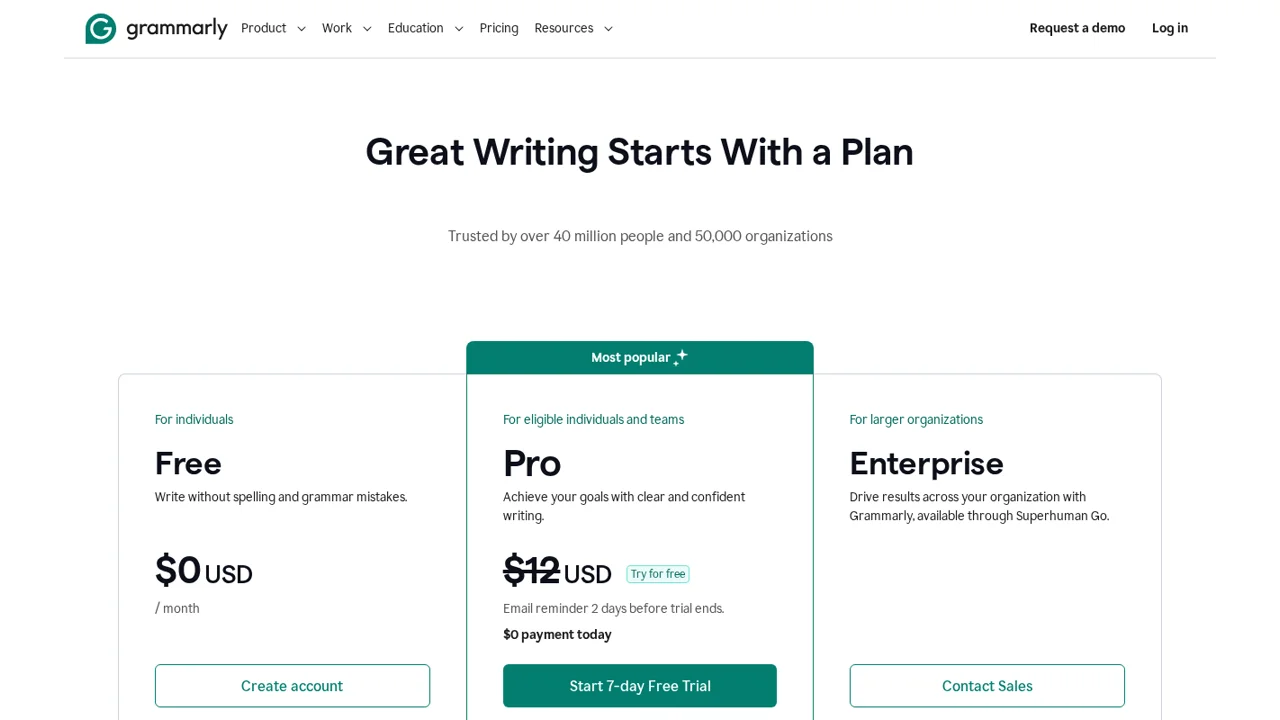
Does Grammarly still have a free plan? Yes. Grammarly’s plans page lists Free at $0/month (spelling and grammar, tone display, 100 AI prompts) and Pro at $12/month with a 7-day trial. Enterprise is sold through what the page now calls “Superhuman Go” — the rebrand from October 2025 is complete on their own site.
What is the cheapest Grammarly alternative? Free, in two different shapes: Harper (open-source, rule-based, browser and editor extensions) and Vale (MIT-licensed command-line linter). The cheapest paid option we could verify is LanguageTool Premium at $5.83/month on annual billing, $69.90 per year.
Is Harper as good as Grammarly? For catching errors, yes — and it is consistent in a way an LLM-based checker is not, because it applies fixed rules instead of generating suggestions. For rewriting sentences and adjusting tone, no, and it does not try to. That is the whole design difference, and it is why the commenters who want a grammar checker like it and the ones who want a writing assistant do not.
Method: 5 Hacker News threads read in full or in part — the cancellation PSA (355 points, 2026-09-23), the Harper launch (645 points, 2025-06), the Refine launch (408 points, 2025-07), the Superhuman rebrand (171 points, 2025-10) and the earlier keylogger argument. Every price above was read from the vendor’s own pricing page on 2026-09-24; QuillBot’s is absent because we could not load it. Quotes are verbatim with comment links. We do not take payments from vendors.